
How to Illustrate a Children's Book with AI
Follow along as we build "Luna and the Whispering Falls Crystal" from a story idea to a fully illustrated picture book — with characters that look the same on every single page.

Illustrating a children's book has traditionally meant two options: spend $2,000–10,000 hiring a professional illustrator and wait months, or try to draw it yourself. AI image generation opened a third path — but anyone who's tried Midjourney or DALL-E for a book quickly hits the same wall: your characters look different in every image.
That's the problem PulseBook was built to solve. In this guide, we'll walk through illustrating a children's book with AI from start to finish — story concept to finished pages — using a real project: Luna and the Whispering Falls Crystal.
Start with Your Story
Every book starts with a story. You don't need a polished manuscript — a rough outline with your main characters and key scenes is enough. PulseBook handles the visual side; you bring the narrative.
For our example, we're creating "Luna and the Whispering Falls Crystal" — a story about a curious girl who discovers a glowing crystal in her overgrown backyard. With the help of a wise owl, a brave frog, and a loyal hedgehog, she sets off on a journey through bogs and ancient ruins to unlock its secret.
Choose Your Illustration Style
Before creating any images, you pick an illustration style. This sets the visual tone for your entire book — and ensures every image feels cohesive. PulseBook comes with 25+ preset styles, from watercolor to anime to gothic fairytale.
For Luna's story, we chose Ligne Claire — a clean, graphic style inspired by Hergé (Tintin) and the European clear-line tradition. Uniform-weight outlines, flat vivid colors, and expressive characters against richly detailed backgrounds.
Ligne claire comic illustration style with clean, uniform-weight outlines and no hatching. Flat areas of color with no gradients. Expressive, slightly cartoonish characters against richly detailed, semi-realistic backgrounds.
The style defines everything: line weight, color approach, character proportions, and environment detail level. Every image you generate from this point forward will follow these guidelines — no gradients, no soft shading, just crisp outlines and bold flat color.
Create Your Characters
This is where PulseBook is fundamentally different from generic AI tools. You create character profiles with detailed descriptions, then generate a master sheet — a reference portrait that the AI uses to keep the character looking identical across every scene.
Our story has four characters. Each one was described once and stays consistent throughout the entire book:
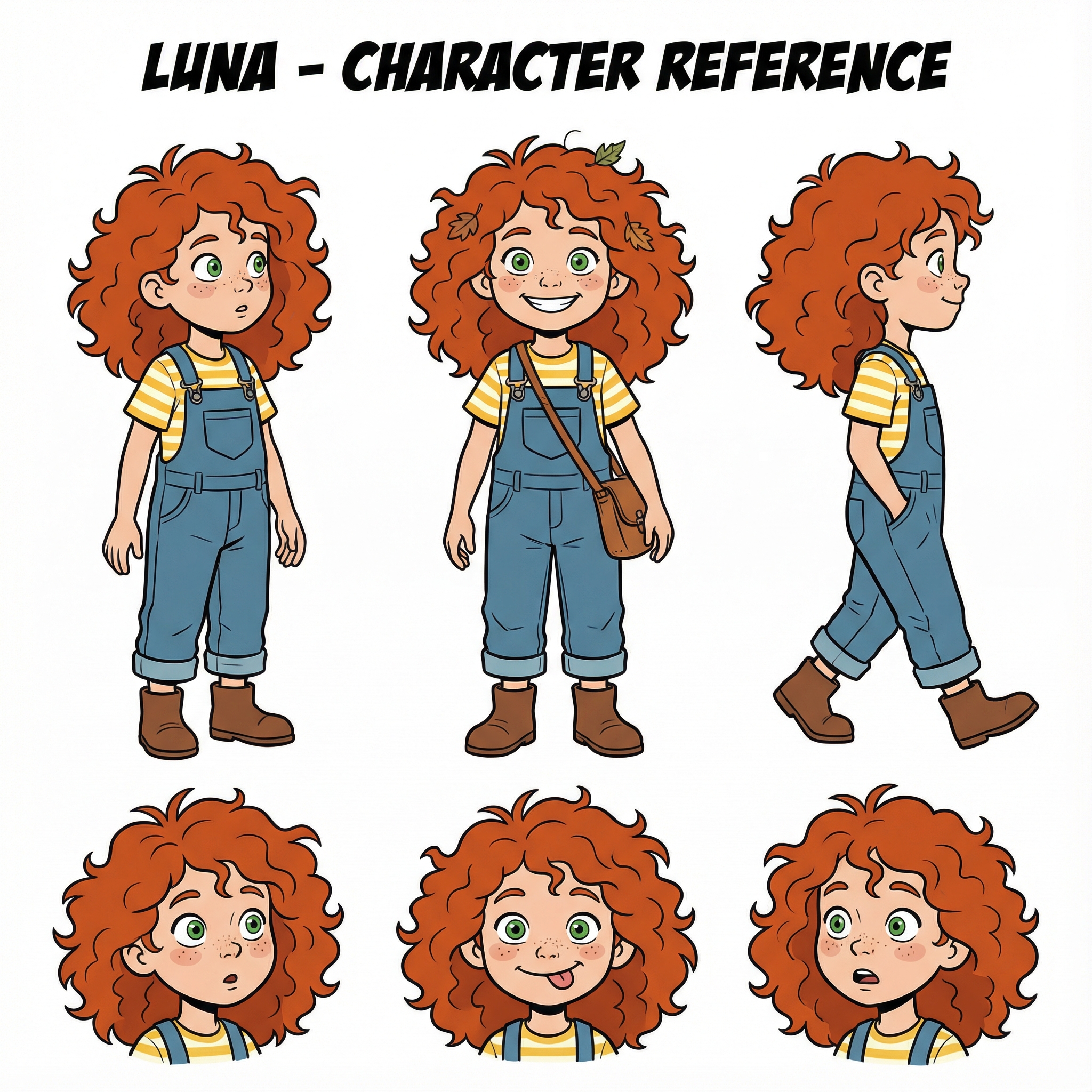
A curious 6-year-old girl with wild curly red hair, freckles, and bright green eyes. She wears blue denim overalls over a yellow striped shirt.
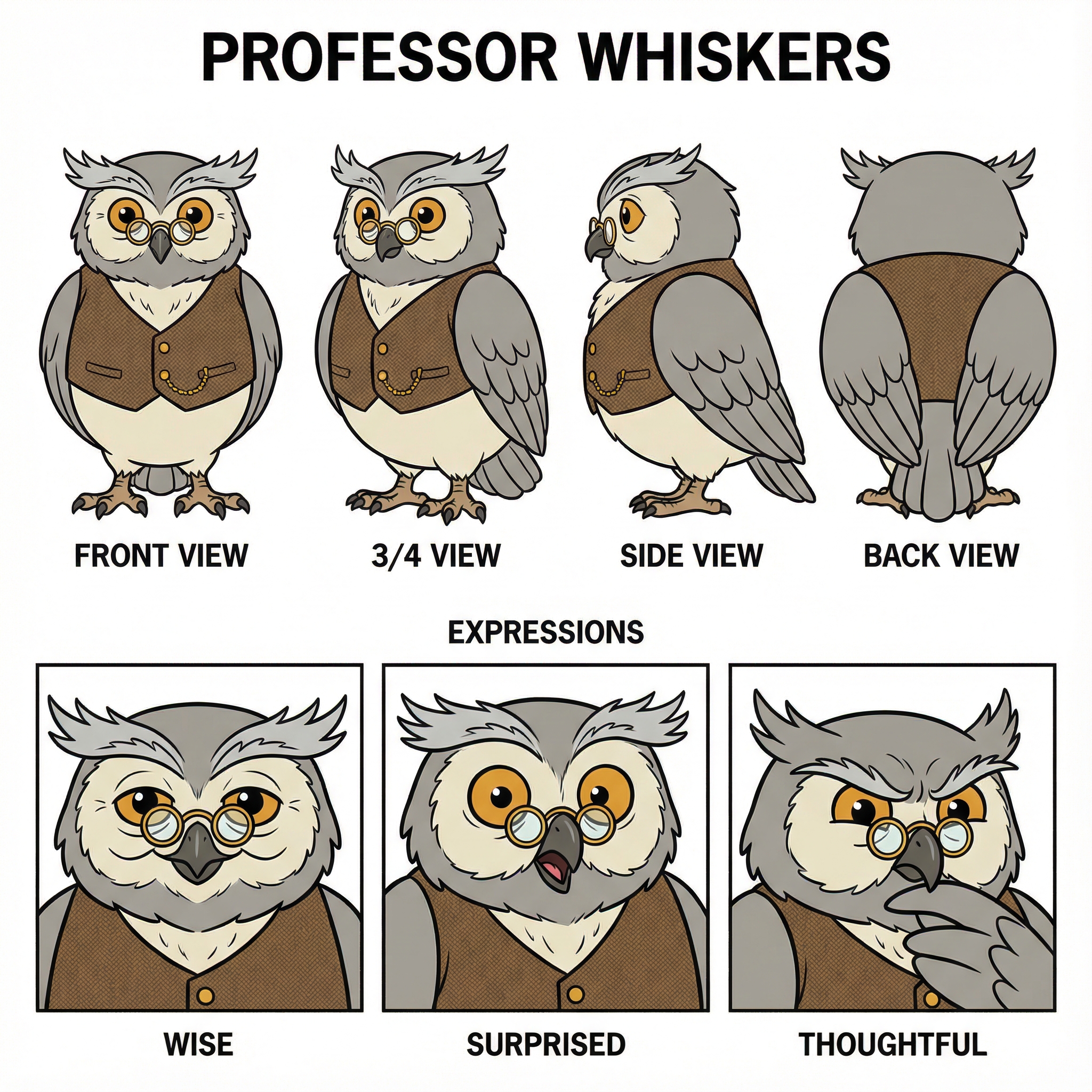
An elderly owl with round spectacles, grey feathers, a wise expression, and a tiny brown vest with gold buttons.
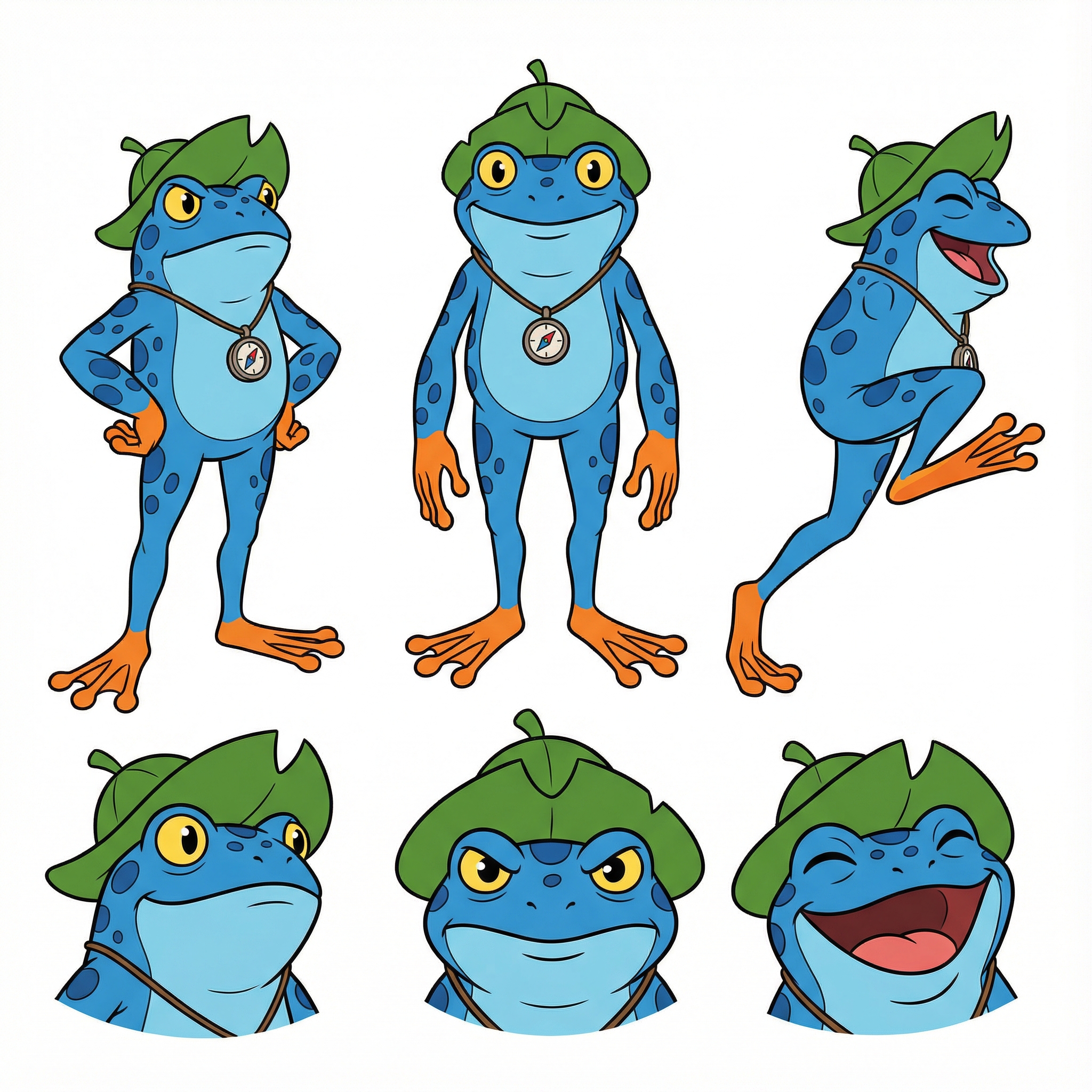
A blue frog with a leaf hat, adventurous expression, slightly larger than a normal frog, with bright orange feet.
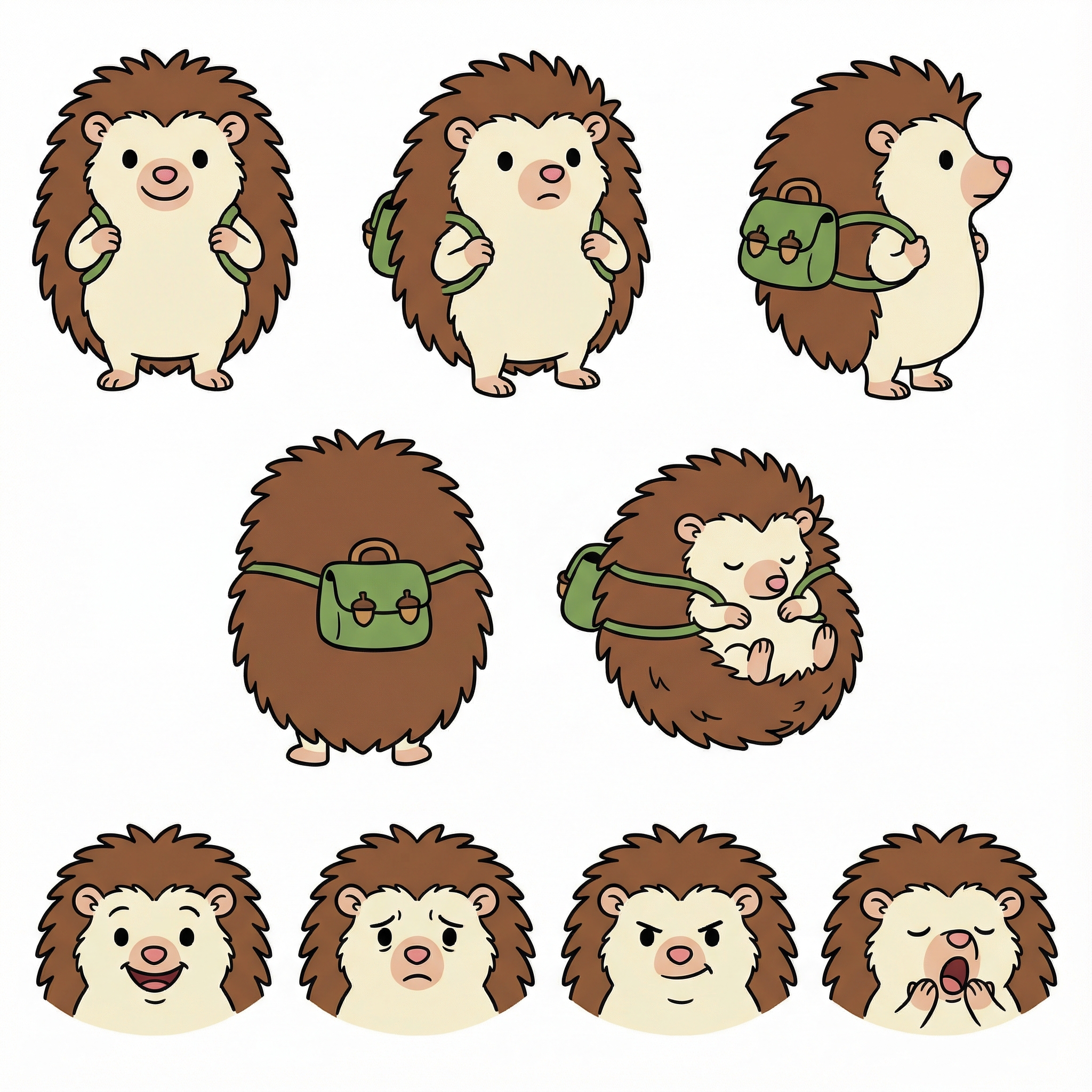
A friendly hedgehog with brown quills, small black eyes, a pink nose, and a tiny green backpack.
The Master Sheet System
The green checkmark means the master sheet is approved — you've reviewed the generated portrait and confirmed it matches your vision. From this point on, every time Luna appears in a scene, the AI references her master sheet to keep her looking like Luna.
Write and Generate Scenes
Now the magic happens. For each scene, you write a description of what's happening and use @mentions to reference your characters and locations. The AI knows exactly who Luna is and what Captain Splash looks like — because you defined them earlier.
The @mention System
Each colored pill is a reference to a character you created. The AI uses their master sheets to keep everything consistent.
Hit generate, and PulseBook creates an illustration that matches your description — with the right characters, in the right style:


Iterating on Results
Notice how Luna looks like Luna in every scene — same curly red hair, same overalls, same freckles. That's the master sheet system at work. If you're not happy with a result, you can refine it with notes ("make her smile bigger", "add more detail to the background") without losing character consistency.
You can also explore the same story in completely different art styles. Here's what two other styles look like — generated in seconds:


Design Your Pages
With your scenes generated, you move to the Book Studio — a drag-and-drop page designer where you combine illustrations with text to create actual book pages. Choose from pre-made layouts or build your own.
Add headers, body text, and position your scene images exactly where you want them. The Book Studio supports multiple page ratios (portrait, landscape, square) and design presets — so your pages look professionally typeset, not like a school project.
Drag and drop your illustrations onto pre-designed page layouts. Add text, adjust positioning, and preview your book in real time.
When you're done, export your finished book as a high-resolution PDF ready for printing or digital distribution. You can also convert it into an animated video with the Video Studio — perfect for sharing on social media or reading aloud.
The Result
In a single afternoon, we used AI to illustrate a children's book with consistent characters, a unified art style, and five detailed scenes. The total cost? Around $25–50 in AI generation credits — compared to $2,000–10,000 for a professional illustrator.
More importantly, you stay in creative control the whole time. You choose the style, design the characters, write the scenes, and decide the layout. The AI handles the drawing — you handle the storytelling.
Frequently Asked Questions
How much does it cost to illustrate a children's book with AI?
Using PulseBook, a fully illustrated children's book costs roughly $25–50 in AI generation credits. Traditional illustration typically runs $2,000–10,000 depending on page count and artist rates.
Can AI keep characters consistent across pages?
Yes. PulseBook uses a master sheet system where you generate and approve a reference portrait for each character. The AI references that sheet every time the character appears, keeping their look identical across all scenes.
How long does it take?
Most users complete a fully illustrated book in a single afternoon — roughly 3–4 hours from story concept to finished pages.
Do I need drawing skills?
No. You write text descriptions of your characters and scenes, and the AI generates the illustrations. You stay in creative control — choosing styles, designing characters, writing scene prompts — without needing to draw anything yourself.